Components
Containers
Three containers are provided for interacting with URLs:
| Name | Description |
|---|---|
A valid, modifiable URL which performs dynamic memory allocation to store the character buffer. |
|
A read-only reference to a character buffer containing a valid URL. The view does not retain ownership of the underlying character buffer; instead, it is managed by the caller. |
|
A valid, modifiable URL which stores the character buffer inside the class itself. This is a class template, where the maximum buffer size is a non-type template parameter. |
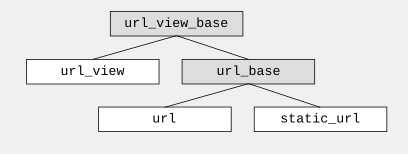
Inheritance provides the observer and modifier public members; class
url_view_base
has all the observers, while class
url_base
has all the modifiers.
Although the members are public, these base classes can only be constructed by the library as needed to support the implementation.
The class hierarchy looks like this:
Throughout this documentation and especially below, when an observer is discussed, it is applicable to all three derived containers shown in the table above.
When a modifier is discussed, it is relevant to the containers
url and static_url.
The tables and exposition which follow describe the available observers and modifiers, along with notes relating important behaviors or special requirements.
Scheme
The most important part is the scheme, whose production rule is:
scheme = ALPHA *( ALPHA / DIGIT / "+" / "-" / "." )The scheme, which some informal texts incorrectly refer to as "protocol", defines how the rest of the URL is interpreted. Public schemes are registered and managed by the Internet Assigned Numbers Authority (IANA). Here are some registered schemes and their corresponding specifications:
| Scheme | Specification |
|---|---|
http |
|
magnet |
|
mailto |
|
payto |
|
telnet |
|
urn |
Private schemes are possible, defined by organizations to enumerate internal resources such as documents or physical devices, or to facilitate the operation of their software. These are not subject to the same rigor as the registered ones; they can be developed and modified by the organization to meet specific needs with less concern for interoperability or backward compatibility. Note that private does not imply secret; some private schemes such as Amazon’s "s3" have publicly available specifications and are quite popular. Here are some examples:
| Scheme | Specification |
|---|---|
app |
|
odbc |
|
slack |
In some cases the scheme is implied by the surrounding context and therefore omitted. Here is a complete HTTP/1.1 GET request for the target URL "/index.htm":
GET /index.htm HTTP/1.1
Host: www.example.com
Accept: text/html
User-Agent: Beast
The scheme of "http" is implied here because the context is already an HTTP request. The production rule for the URL in the request above is called origin-form, defined in the HTTP specification thusly:
origin-form    = absolute-path [ "?" query ]

absolute-path = 1*( "/" segment )|
All URLs have a scheme, whether it is explicit or implicit. The scheme determines what the rest of the URL means. |
Here are some more examples of URLs using various schemes (and one example of something that is not a URL):
| URL | Notes |
|---|---|
|
Hierarchical URL with |
|
Hierarchical URL with |
|
Opaque URL with |
|
Opaque URL with |
|
URL reference. Missing scheme and authority. |
|
A Protocol-Relative Link (PRL). Not a URL. |
API Reference
The scheme is represented as a case-insensitive string, along with an enumeration constant which acts as a numeric identifier when the string matches one of the well-known schemes: http, https, ws, wss, file, and ftp. Characters in the scheme are never escaped; only letters and numbers are allowed, and the first character must be a letter.
These members are used to inspect and modify the scheme:
| Function | Return Type | Description |
|---|---|---|
Return |
||
Return the scheme as a string, or the empty string if there is no scheme. |
||
Return the scheme as an enumerated constant, the value
|
| Function | Parameters | Description |
|---|---|---|
Set the scheme to a string. |
||
Set the scheme to a well-known scheme constant. |
||
Remove the scheme if present. This includes the trailing colon (":"). |
|
Some package managers (pip, npm) and tools use compound schemes like This is an informal convention, not a URL standard. See WHATWG discussion. |
Authority
The authority determines how a resource can be accessed. It contains two parts: the userinfo that holds identity credentials, and the host and port which identify a communication endpoint having dominion over the resource described in the remainder of the URL. This is the ABNF specification for the authority part:
authority = [ user [ ":" password ] "@" ] host [ ":" port ]The combination of user and optional password is called the userinfo.
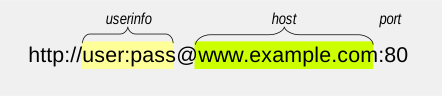
Some observations:
-
The use of the password field is deprecated.
-
The authority always has a defined host field, even if empty.
-
The host can be a name, or an IPv4, an IPv6, or an IPvFuture address.
-
All but the port field use percent-encoding to escape delimiters.
The host subcomponent represents where resources are located.
|
Note that if an authority is present, the host is always defined even if it is the empty string (corresponding to a zero-length reg-name in the BNF). |
The authority component also influences how we should interpret the URL path. If the authority is present, the path component must either be empty or begin with a slash.
|
Although the specification allows the format It is not recommended to transfer password data through URLs unless this is an empty string indicating no password. |
API Reference
The authority is an optional part whose presence is indicated by an unescaped double slash ("//") immediately following the scheme, or at the beginning if the scheme is not present. It contains three components: an optional userinfo, the host, and an optional port.
An empty authority, corresponding to just a zero-length host component, is distinct from the absence of an authority. These members are used to inspect and modify the authority as a whole string:
| Function | Return Type | Description |
|---|---|---|
Return |
||
Return the authority as a decoded string. |
||
Return the authority as a read-only view. |
| Function | Parameters | Description |
|---|---|---|
Set the authority to the string, which may contain percent escapes. Reserved characters are percent-escaped automatically. |
||
Remove the authority if present. This includes the leading double slash ("//"). |
The paragraphs and tables that follow describe how to interact with the individual parts of the authority.
Userinfo
An authority may have an optional userinfo, which consists of a user and optional password. The presence of the userinfo is indicated by an unescaped at sign ("@") which comes afterwards. The password if present is prefixed by an unescaped colon (":"). An empty password string is distinct from no password. This table shows various URLs with userinfos, and the corresponding user and password:
| URL | User | Password | Notes |
|---|---|---|---|
|
"user" |
"pass" |
User and password |
|
"" |
Empty user, no password |
|
|
"user" |
No password |
|
|
"user" |
"" |
Empty password |
|
"" |
"pass" |
Empty user |
|
"" |
"" |
Empty user and password |
|
Although the specification allows the format username:password, the password component is deprecated and should be avoided if possible or otherwise used with care. It is not recommended to transfer password data through URLs unless it is an empty string indicating no password. |
These members are used to inspect and modify the userinfo:
| Function | Return Type | Description |
|---|---|---|
Return |
||
Return |
||
Return the user as a decoded string. |
||
Return the password as a decoded string. |
||
Return the userinfo as a decoded string. |
||
Return the user. |
||
Return the password, or an empty string if no password is present. |
||
Return the userinfo. |
| Function | Parameters | Description |
|---|---|---|
Set the user to the string. Reserved characters are percent-escaped automatically. |
||
Set the password to the string. Reserved characters are percent-escaped automatically. |
||
Set the userinfo to the string. Reserved characters are percent-escaped automatically. |
||
Set the user to the string, which may contain percent escapes. Reserved characters are percent-escaped automatically. |
||
Set the password to the string, which may contain percent escapes. Reserved characters are percent-escaped automatically. |
||
Set the userinfo to the string, which may contain percent escapes. Reserved characters are percent-escaped automatically. |
||
Remove the password if present. This includes the password separator colon (":"). |
||
Remove the userinfo if present. This includes the user and password separator colon (":") and the trailing at sign ("@"). |
Host
The host portion of the authority is a string which can be a host name, an IPv4 address, an IPv6 address, or an IPvFuture address depending on the contents. The host is always defined if an authority is present, even if the resulting host string would be zero length.
These members are used to inspect and modify the host:
| Function | Return Type | Description |
|---|---|---|
Return the host type enumeration constant.
If there is no authority, this is the value
|
||
Return the host as a decoded string, or an empty string if there is no authority. |
||
Return the host as a decoded string.
If the host type is
|
||
Return the host name as a decoded string, or the empty string if
the host type is not
|
||
Return the host as an |
||
Return the host as an |
||
Return the host as a string without enclosing brackets if
the host type is
|
||
Return the host, or an empty string if there is no authority.
This includes enclosing brackets if the host type is
|
||
Return the host.
If the host type is
|
||
Return the host name as a string. If the host type is not
|
| Function | Parameters | Description |
|---|---|---|
Set the host to the string, depending on the contents. If
the string is a valid IPv4 address, a valid IPv6 address
enclosed in brackets, or a valid IPvFuture address enclosed
in brackets then the resulting host type is
|
||
Set the host to the string, depending on the contents. If
the string is a valid IPv4 address, a valid IPv6 address, or
a valid IPvFuture address then the resulting host type is
|
||
Set the host to the IPv4 address. The host type is
|
||
Set the host to the IPv6 address. The host type is
|
||
Set the host to the IPvFuture address, which should not include
square brackets. The host type is
|
||
Set the host to the string.
Any reserved characters are percent-escaped automatically.
The host type is
|
||
Set the host to the string, depending on the contents. If
the string is a valid IPv4 address, a valid IPv6 address
enclosed in brackets, or a valid IPvFuture address enclosed
in brackets then the resulting host type is
|
||
Set the host to the string, depending on the contents. If
the string is a valid IPv4 address, a valid IPv6 address, or
a valid IPvFuture address then the resulting host type is
|
||
Set the host to the string, which may contain percent escapes.
Any reserved characters are percent-escaped automatically.
The host type is
|
Port
The port is a string of digits, possibly of zero length. The presence of a port is indicated by a colon prefix (":") appearing after the host and userinfo. A zero length port string is distinct from the absence of a port. The library represents the port with both a decimal string and an unsigned 16-bit integer. If the numeric value of the string would exceed the range of the integer, then it is mapped to the number zero.
These members are used to inspect and modify the port:
| Function | Return Type | Description |
|---|---|---|
Return |
||
Return the port as a string, or an empty string if there is no port. |
||
Return the port as an unsigned integer. If the number would be greater than 65535, then zero is returned. |
| Function | Parameters | Description |
|---|---|---|
Set the port to a string. If the string contains any character which is not a digit, an exception is thrown. |
||
Set the port to a number. |
||
Remove the port if present. This does not remove the authority. |
Path
Depending on the scheme, the path may be treated as a string, or as a hierarchically structured sequence of segments delimited by unescaped forward-slashes ("/"). A path is always defined for every URL, even if it is the empty string.
These members are used to inspect and modify the path:
| Function | Return Type | Description |
|---|---|---|
Return |
||
|
Return the path as a decoded string. |
|
Return the path. |
||
Return the path as a range of decoded segments. |
||
Return the path as a range of segments. |
| Function | Parameters | Description |
|---|---|---|
Set the path to the string. Reserved characters are percent-escaped automatically. |
||
Set whether the path is absolute. |
||
Set the path to the string, which may contain percent escapes. Reserved characters are percent-escaped automatically. |
||
Return the path as a modifiable range of decoded segments. |
||
Return the path as a modifiable range of segments. |
The segments-based containers
segments_view, segments_ref,
segments_encoded_view, and segments_encoded_ref
are discussed in a later section.
Query
Depending on the scheme, the query may be treated as a string, or as a structured series of key-value pairs (called "params") separated by unescaped ampersands ("&"). The query is optional; an empty query string is distinct from no query.
These members are used to inspect and modify the query:
| Function | Return Type | Description |
|---|---|---|
Return |
||
Return the query as a decoded string. |
||
Return the query. |
||
Return the query as a read-only range of decoded params. |
||
Return the query as a read-only range of params. |
| Function | Parameters | Description |
|---|---|---|
Set the query to a string. Reserved characters are percent-escaped automatically. |
||
Set the query to a string, which may contain percent escapes. Reserved characters are percent-escaped automatically. |
||
Return the query as a modifiable range of decoded params. |
||
Return the query as a modifiable range of params. |
||
Remove the query. This also removes the leading question mark ("?") if present. |
The params-based containers
params_view, params_ref,
params_encoded_view, and params_encoded_ref
are discussed in a later section.
Fragment
The fragment is treated as a string; there is no common, structured interpretation of the contents.
These members are used to inspect and modify the fragment:
| Function | Return Type | Description |
|---|---|---|
Return |
||
Return the fragment as a decoded string. |
||
Return the fragment. |
| Function | Parameters | Description |
|---|---|---|
Set the fragment to the string. Reserved characters are percent-escaped automatically. |
||
Set the fragment to the string, which may contain percent escapes. Reserved characters are percent-escaped automatically. |
||
Remove the fragment. This also removes the leading pound sign ("#") if present. |
Compound Fields
For convenience, these observers and modifiers for aggregated subsets of the URL are provided:
| Function | Return Type | Description |
|---|---|---|
Return the host and port as a string with percent escapes. |
||
Return only the scheme and authority parts as an individual string. |
||
Return only the path, query, and fragment parts as an individual string. |
||
Return only the path and query parts as an individual string. |
| Function | Parameters | Description |
|---|---|---|
Remove the scheme and authority parts from the URL. |